Sense flip clock & weather Pro
MACHAPP Software LtdWeather
4.3236.00 Reviews
- Version
- 9.14.0
- Installs
- 10.00K
- Age Rating
- Everyone
Screenshots
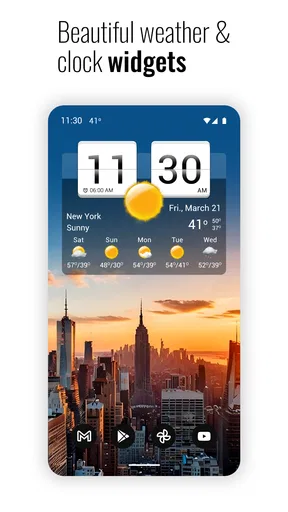
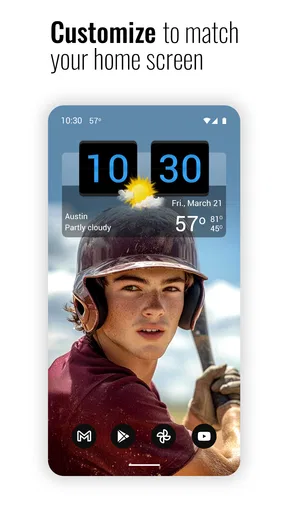
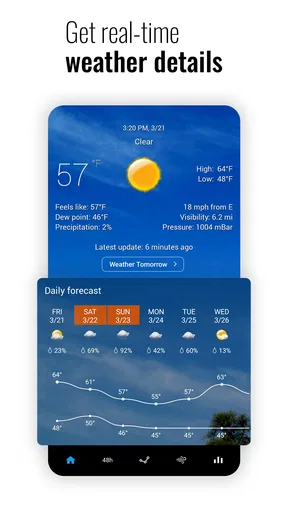
Our Review of Sense flip clock & weather Pro
 Analysis by Appyee
I like weather apps that do more than place a temperature number in a notification panel. Sense flip clock & weather Pro takes a more visual approach, combining a flip-clock style display with local and international forecasts and clock widgets. After spending time with it, I see it as a practical choice for people who want their home screen to feel organized and a little more distinctive, rather than as a replacement for a specialist weather service.
The app comes from MACHAPP Software Ltd and sits in the weather category, although its clock presentation is a major part of its identity. It is aimed at Android users running version 7.0 or newer, carries an Everyone age rating, and is currently listed as version 9.14.0. Its average rating is 4.3 from around 1.9K ratings, with roughly 236 written reviews, while the install count is over 10K. Those figures suggest a modest but established audience rather than a mass-market utility.
There is an important price question before you install it. The listed price is $10.99, and the app also shows in-app purchases ranging from $4.99 to $15.99 per item. That makes this a product worth evaluating carefully if you only want a basic forecast. Its value depends on whether you will actually use the clock-and-widget presentation every day.
How the current version fits into everyday use
The first thing I noticed is that the app makes the home screen part of the weather experience. Instead of opening a plain forecast page whenever I want to know the conditions, I can use the clock display as a quick visual checkpoint. The flip-style design gives the interface a stronger personality than the usual row of weather cards, and the combination of time and forecast information is useful when I am getting ready to leave.
That approach works particularly well on a bedside table or a frequently used home screen. I can glance at the time and get a weather impression without switching between separate clock and weather tools. It also suits users who travel or keep track of more than one place, since the app is designed for local and international forecasts. For someone who wants a familiar clock face with weather information attached, that combination is more appealing than a bare forecast feed.
My main caution is that a widget is only useful when it remains readable and relevant in the layout where it is placed. A large clock-weather widget can consume valuable home-screen space, while a smaller one may sacrifice some detail. I would decide where it belongs before paying: if your phone already has a crowded launcher, the app may feel decorative rather than essential.
The clock is the real reason to choose it
Many weather apps compete through dense charts, radar layers, warning maps, and long-range data. This one takes a different route. The flip-clock presentation is the feature that gives it a clear personality, and the weather information supports that visual centerpiece. I would recommend it to someone who enjoys a clock-focused home screen and wants weather available at the same glance.
I would not choose it solely because I need the deepest possible meteorological analysis. For planning a hike, checking storm development, or comparing several forecast models, a dedicated weather service may be the better tool. The strength here is convenience and presentation: it turns a routine glance at the time into a compact weather check.
There is also a subtle workflow advantage. I can use the widget as a decision prompt rather than as a complete forecast session. If the display suggests a change from the conditions I expected, I can then open a more detailed view or another trusted source. In that role, the app reduces the number of times I need to search for basic information without pretending that a home-screen glance replaces careful planning.
What the version history means for existing users
The current version, 9.14.0, shows that the app is still presented as a maintained product rather than an abandoned clock skin. The app was released on March 17, 2016, so it has had a long life compared with many short-lived utilities. That history matters for existing users because a long-running app has had time to refine its central idea and adapt to changing Android environments.
At the same time, I would separate that evidence from assumptions about what a future update will bring. A current version number tells me which build I am considering, but it does not promise a particular redesign, new forecast source, or compatibility improvement later. I would install the present release for what it offers now, not for an imagined roadmap.
For someone upgrading from an older installation, the practical question is whether the current interface still matches the way the widget is used. A user who mainly wants the flip clock may notice the app’s continued focus immediately. Someone who expected the product to evolve into a full weather-analysis dashboard may find that its original identity remains more important than expansion into every possible weather feature.
That continuity can be a benefit. Familiar users are less likely to feel that the app has abandoned its purpose, and the clock-weather relationship remains easy to understand. The trade-off is that people seeking a radically different experience may not find enough reason to switch from their existing weather tool.
A realistic morning scenario
Imagine a weekday morning when I am leaving for work and do not want to open several apps. I glance at the home screen for the time, notice the current weather presentation, and decide whether a light jacket is sensible. If I am heading somewhere else later, I can check the relevant location rather than relying only on the conditions outside my window. That is where the app feels most useful: it supports a quick decision at the exact moment I am already looking at the clock.
For travel, the international focus can also be convenient. I can keep a destination in view while still using the clock as the main visual anchor. I would still verify important travel decisions with a more detailed source, especially when delays, severe weather, or outdoor activities are involved. The app is a compact planning aid, not something I would treat as my only authority in a safety-critical situation.
Another useful setup is a shared household phone or tablet placed in a common room. The clock format is immediately understandable, and the weather element can help everyone make a quick plan before going out. The downside is that a display designed for one person’s preferences may not suit everyone, so I would spend time arranging the widget and location choices rather than accepting the first layout.
Where it compares well with ordinary alternatives
The usual alternative is the weather widget already included with an Android phone. That option is often faster to set up and may be enough for anyone who only wants the temperature and a simple forecast. Sense flip clock & weather Pro earns consideration by making the clock itself more prominent and giving the home screen a specific visual style.
Another alternative is a dedicated clock widget paired with a separate weather app. That combination can offer more flexibility, but it also creates two separate interfaces and may require more space. This app’s appeal is that it brings those two everyday checks together. I find that more coherent than stacking unrelated widgets, provided I like the flip-clock look.
Against a feature-heavy weather application, the comparison is less straightforward. A specialist app may be better for radar, alerts, detailed hourly planning, or technical weather information. This product is better when I value instant visibility and a recognizable interface. The right choice depends less on which app has the longest feature list and more on whether the home-screen clock is something I will actually use.
Small decisions that make the setup better
I would begin by choosing the widget location before exploring every option. Putting it on the first home-screen page makes the information genuinely glanceable; hiding it on a secondary page turns the app into something I have to remember to visit. This sounds obvious, but it is the difference between a useful routine and an attractive installation that I rarely open.
I would also avoid treating the clock as a substitute for checking the forecast in detail. My preferred workflow is to use the widget for immediate awareness, then open the app when I need a fuller look at the day or another location. That two-step habit keeps the interface convenient without asking it to do a job better suited to a dedicated forecast view.
A third tip is to judge the app over several ordinary days rather than during one impressive setup session. The flip design is visually distinctive, but long-term value comes from whether the combined clock and weather information saves time. If I keep reaching for another weather app anyway, the paid purchase becomes harder to justify.
International users should think about location management before relying on the app while moving between places. A local forecast is only helpful when the selected place matches the decision I am making. For a trip, I would check the destination in advance and confirm that the display is showing that location before using it as my quick reference.
What may frustrate some users
The biggest limitation is the narrowness of the product’s central idea. If you want a simple, free weather glance, paying $10.99 may feel excessive. If you want advanced weather tools, the clock-first design may feel too restrained. The app sits between those groups: more distinctive than a basic widget, but not necessarily the best specialist instrument for serious forecasting.
The purchase structure also deserves attention. The listed price is already a meaningful commitment for a utility, and the additional in-app purchase range means I would read the purchase screen carefully before confirming anything. I would not assume that paying for the app automatically means every optional element is included. A buyer should be comfortable with the overall cost before making it part of a daily setup.
Visual preference is another real issue. Flip clocks have a particular character, and that character will either make the home screen feel better or make it feel dated and busy. I like the style in the right context, but I can imagine users preferring a quieter, minimalist widget. This is not a flaw that an update can necessarily solve; it is a matter of whether the design matches your phone.
The app is also less compelling for people who never use widgets. If you normally open a weather app only when severe conditions are expected, a clock-centered product may add little to your routine. Likewise, users who need weather information for professional or highly technical decisions should compare it with tools built specifically for those needs rather than choosing it for appearance alone.
Who should install it, and who should skip it
I think it is a good fit for Android users who want a combined clock and weather widget, enjoy a flip-style interface, and regularly make quick decisions based on the conditions outside. It is especially suitable for a home screen, bedside display, or travel-oriented setup where time and location matter together.
I would skip it if my priority were the lowest-cost forecast, a minimalist interface, or advanced weather analysis. I would also hesitate if I already have a clock widget I love and a dependable weather app that covers my needs. In that situation, the paid purchase would mostly buy a change in presentation rather than a necessary improvement to the routine.
The Everyone rating makes it broadly approachable, and the Android requirement of version 7.0 or newer covers a wide range of devices. Still, compatibility alone does not settle the buying decision. The more important question is whether the app’s specific visual workflow earns a permanent place on your home screen.
What I would watch before committing
For new users, I would watch how comfortably the current version fits into the launcher: whether the clock remains readable at the chosen size, whether the weather information is visible without clutter, and whether switching between local and international locations feels natural in daily use. Those practical details matter more than a polished first impression.
For existing users, I would pay attention to future changes that affect the balance between the clock and the forecast. A useful update would preserve the quick-glance identity while making everyday setup and location handling smoother. I would be cautious about expecting a completely different kind of weather service, because the app’s appeal comes from its focused presentation.
I would also watch the relationship between the paid purchase and optional purchases. Clear value is important for a utility that users may compare with built-in Android tools. If the app continues to make its core clock-weather experience worthwhile without unnecessary friction, it has a stronger case for people who appreciate design as part of their daily workflow.
My final view is positive but selective. This is not the weather app I would recommend to everyone, and I would not buy it just because I wanted another forecast screen. I would recommend it to a friend who specifically wants the time and weather to live together in a distinctive flip-clock display. If that visual routine sounds useful rather than merely attractive, the app can justify its place on your phone. If your needs are more technical, more minimal, or more budget-conscious, a built-in widget or dedicated weather alternative will probably be the smarter choice.
Verdict
Strengths of Sense flip clock & weather Pro
- Clean flip-clock design with several attractive clock styles.
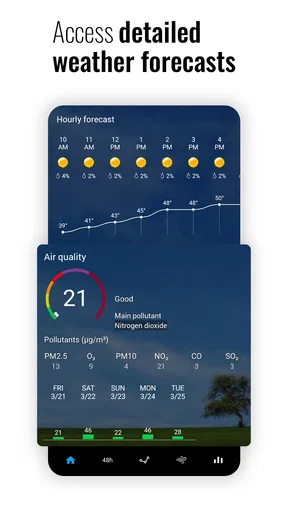
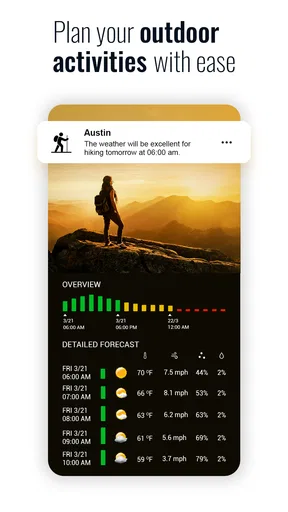
- Accurate weather forecasts with useful hourly and daily details.
- Includes widgets for quick access from the home screen.
- Offers many customization options for colors, layouts, and information.
- Ad-free Pro experience with extra features unlocked.
Limitations of Sense flip clock & weather Pro
- Some advanced customization options may take time to discover.
- Weather accuracy depends on the selected provider and location data.
- Can use noticeable battery power with frequent weather updates.
- Large widgets may occupy considerable space on smaller screens.
- Certain features may require additional paid weather data services.
Other Releases by MACHAPP Software Ltd
View All
Transparent clock and weather
Weather4.2

Sense Flip Clock & Weather
Weather4.2

Sense V2 Flip Clock & Weather
Weather4.2

Transparent clock weather Pro
Weather4.1
Similar Picks in This Category
View All
Weather - By Xiaomi
Xiaomi Inc.4.1

Weather & Radar Forecast
WetterOnline4.8

Weather
OneLouder Apps4.6

AccuWeather: Weather Radar
AccuWeather3.6

The Weather Channel - Radar
The Weather Channel4.6

1Weather Forecasts & Radar
OneLouder Apps4.3
Frequently Asked Questions
What is Sense flip clock & weather Pro?
Sense flip clock & weather Pro is a customizable clock and weather application designed for Android devices. It combines a large flip-style digital clock with current weather conditions, forecasts, temperature details, and additional information such as humidity or wind. During testing, the app felt particularly useful as a home-screen or bedside display, while its visual style gives the interface a retro, dashboard-like appearance.
What features are included in the Pro version?
The Pro edition generally focuses on a cleaner, more complete experience than the free version, with additional customization options and fewer or no advertising interruptions, depending on the release. Users can typically adjust clock layouts, weather information, appearance, widgets, update behavior, and other display preferences. Available features may vary by version, device, and region, so checking the current store description is recommended before purchasing or downloading.
Does Sense flip clock & weather Pro provide accurate weather forecasts?
The application displays weather information supplied by its configured weather service, so accuracy depends on the data provider, your selected location, and the availability of local weather stations. Current conditions are usually more reliable than longer-range forecasts, which can change frequently. For the best results, enable location access or manually select the correct city, and allow the app to refresh its weather data when needed.
Does the app require location permission or an internet connection?
Sense flip clock & weather Pro can usually work with a manually selected location, but location permission may be requested to identify your current city automatically. An internet connection is needed to download updated weather conditions, forecasts, maps, or related data. The clock itself can continue displaying offline, although weather information may become outdated until the application reconnects and performs another update.
Is Sense flip clock & weather Pro worth downloading?
The app is worth considering if you want a visually distinctive flip clock combined with convenient weather information in one interface. Its main strengths are the retro design, at-a-glance readability, and customization potential. However, users who only need a basic clock or a highly detailed professional weather service may find it unnecessary. Before downloading, confirm Android compatibility, current permissions, pricing, and the latest feature list.
